
Concept
Toolbar customization allows the administrator to customize the toolbars such that only functions that are relevant for the current user are shown. There is also a new customization option to allow the administrator to remove the SmarTeam menu from the CATIA interface.

Configuration
The administrator can configure the toolbar in the standard way. To access this category, from the CATIA Tools menu, select Options to open the Options dialog box.
The administrator can configure the toolbar in the standard way.
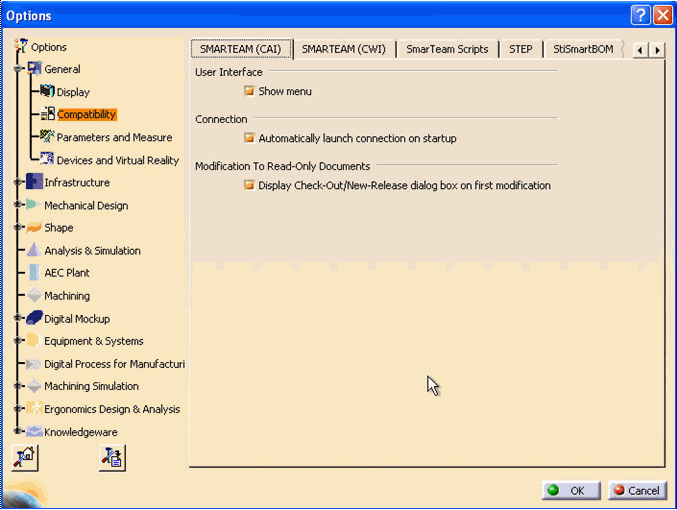
The SmarTeam (CAI) tab contains the following options:
User Interface > Show menu- Mark the Show menu check box to display the SmarTeam dropdown menu while working in CATIA.
- Clear the Show menu check box to remove the SmarTeam dropdown menu from the CATIA interface.
For details about the remaining fields in this window, see Other SmarTeam Options for CATIA Integrations.
SmarTeam Category
In CATIA, a new category named SmarTeam has been added to facilitate easy selection of SmarTeam commands.To access the SmarTeam category:
-
From the Commands tab, select SmarTeam.
The SmarTeam commands appear in the right pane.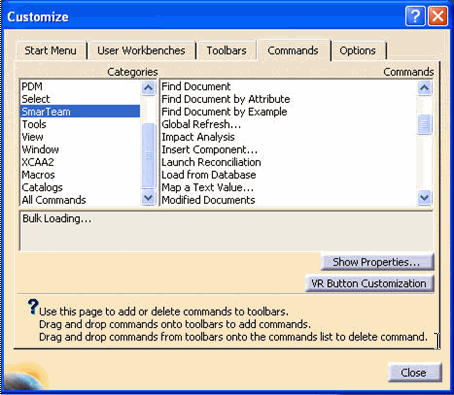
Using this category, the administrator can create a SmarTeam toolbar which includes the required SmarTeam functions for each role. For example, options such as Save, Check In and Check Out can be assigned to the toolbar.
