
This task will show you how to insert text before or after the dimension value.

Open the Brackets_views02.CATDrawing document. Create a distance dimension, for example.
Go to Tools > Options > Mechanical Design > Drafting > Manipulators tab, and select the Modification check box for the Insert text before and the Insert text after options.

-
Click the dimension to be modified.
The dimension is highlighted and two manipulators appear, both before and after the dimension value.
-
Click the manipulator before the dimension value, for example.
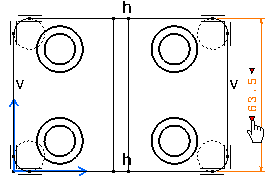
The Insert Text Before dialog box is displayed.
-
Enter the text that you want to add before the dimension value, L= for instance.
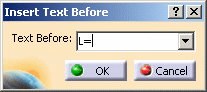
-
Click OK. The text is automatically inserted before the dimension value.
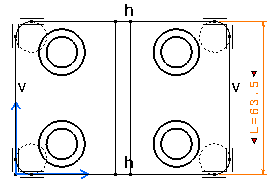

Note that the last five created Text Before are automatically added to the drop-down list in the dialog box and can therefore be selected again from this list. -
Click in the free space.
When using the Restore Value Position option from the contextual menu, note that the Text Before and Text After the dimension value will not be taken into account.
